

Purpose-built for
Your GTM data is scattered. Petavue's agents unify it and tell you exactly what to do next.
AI agents continuously monitor your metrics, surface what's shifting, show marketers what's working — and deliver the proof to back it up.
Track. Analyze. Recommend.
Three things the agent does continuously — with no prompting required once you've configured your definitions.


Not a template. An analyst who already knows your domain.
Skills are what make Petavue agents understand GTM data — not just retrieve it. Each agent comes with a deep understanding of B2B GTM analysis built in, so it knows what questions to ask, what patterns to look for, and what good looks like in your data.
Everything in one place.
Dashboards that stay current, an AI analyst that works across contexts, and workflows you configure to match how your team operates.
Building, editing, and maintaining dashboards with Petavue is 10x faster than working with static dashboards. Sage builds them with you — and stays connected to them after they're live, so the relationship between your dashboards and your AI analyst is two-way.
Sage is an AI analyst that understands your configured metrics and data — not a generic chatbot. It works both inside dashboards and as a standalone analyst your team can query at any time.
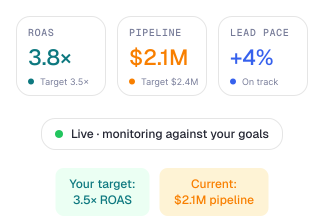
Workflows define what the agent monitors, when it alerts, and what it delivers — and where. Configure them once; the agent runs them continuously. Below is what a configured workflow looks like and what it produces.
Built for GTM data. Not built for everything.
Generic AI tools are powerful. They're just not built for metrics calculation and deep analysis with full context recommendations — and without that, they require constant upkeep to stay accurate, adding overhead and cost. Petavue requires no prompting — the agents know what to look for and surface it automatically.

What changes for your team
A story leadership trusts.
For CMOs who need verified metrics to stand behind — and a clear case for marketing's contribution to revenue.
Core marketing metrics tracked continuously — not assembled the week before a board meeting
Budget recommendations grounded in your closed-won data — not industry benchmarks
Every analysis is explainable — full source lineage from raw data to executive summary
Stakeholders can self-serve answers via Sage — without waiting for your team to pull a report
No more manual pull before board meetings — dashboards are already current
Grounded in your closed-won patterns, not industry averages
Full lineage and assumptions documented on every metric
Not lagging indicators.
For demand gen leaders who need to know what's working while there's still time to change it.
Campaign underperformance detected against your baseline — not after quarter-end
Lead pacing monitored by segment with early warning before a shortfall becomes a pipeline miss
Channel attribution enforced against your definitions — no silent crediting of low-intent touches
Every insight comes with a specific recommendation and budget estimate attached
Underperformance caught against your baseline while there's time to act
Warning before it shows up in the pipeline report
Recommendation with budget impact estimate — no separate analysis needed
No pipeline to maintain.
For Marketing Ops leaders who need the analysis to match their definitions — without owning the infrastructure that makes it work.
Key definitions — qualified opportunity, campaign influenced, SDR sourced — enforced automatically on every output
Definition updates take effect immediately — no engineering tickets, no deployment cycle
Custom Skills for proprietary logic — your blended ROAS formula, your ABM scoring model — owned permanently by the agent
Agent runs continuously without ops resources required to keep it running
Every output checked against your definitions automatically
Change a definition — active on the next output, no deployment needed
No ops team required to keep the agent running

.svg)
